
iPhoneTricks.org

iOS, watchOS, macOS & more!

  • Home
  • About
  • Contact
  • Bugs?
  • Review?
  • Giveaways
share on facebook youtube share on twitter share on twitter
  • iOS 17.6
  • iPadOS 17.6
  • macOS 14.6
  • watchOS 10.6
  • tvOS 17.6
  • HomePod 17.6
  • AirPods 6.5
  • Safari 17.6
  • visionOS 1.3
  • iPhone 15 Pro
  • iPhone 15
  • Apple Watch 9
  • Apple Watch Ultra 2
  • AirPods Pro 2
  • HomePod 2
  • Vision Pro

iPhone Tricks > TILs

How To Animate The Apple Event September 15 Logo On iPhone
Posted in TILs by Patricia on September 11, 2020

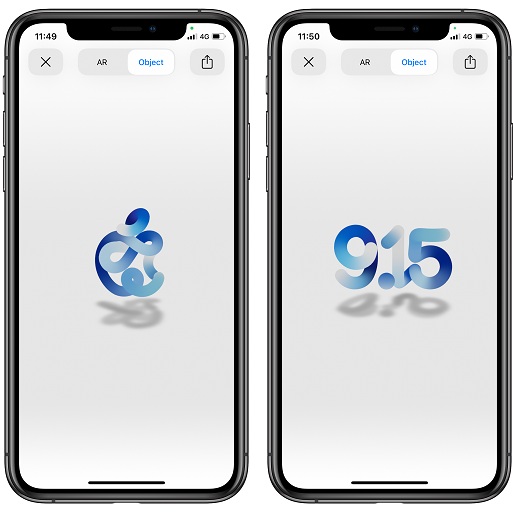
september 15 apple event morphing logo

September 15 Apple Event morphing logo.

As the case with previous Apple events, the September 15 keynote is also promoted with the help of a graphical experience. This time the Cupertino-based tech giant has created an animated logo that, when played in AR, morphs from an a bitten apple, to the date of the event (9.15) and vice-versa.

On Apple.com’s event web page, the September 15 event logo is static and displays an apple in various shades of blue.
However, if you visit the same page on an iPhone or iPad you can animate the logo and see how it morphs from the shape of an apple to the 9.15 date.
More, the animated graphic is displayed in real world, with the help of the iPhone camera and the Augmented Reality (AR) technology.

How To Animate The September 15 Event Apple Logo
how to animate the september 15 apple event logo
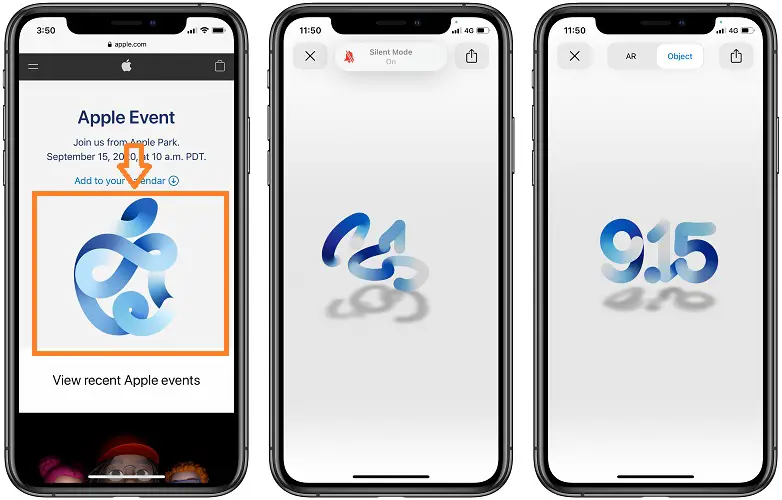
1. Open the official event web page, using an iPhone or iPad. (Direct link)
2. Tap on the blue apple graphic. The iPhone enters AR mode.
3. Move your device around to calibrate the AR experience, until the September 15 event logo is displayed on your screen. Watch how it morphs to ‘9.15’ and back to the ‘blue apple’.

Tip: Pinch the graphic to change it’s size, rotate and frame it better in the viewfinder. You can perform a screenshot and save the frame to your Photos app and even perform a screen recording.

Trick: Tap the Object tab, available at the top of the screen, to watch the Apple logo animation without the real life environment available with the help of the iPhone Camera.

Fact: There’s also a Share button, available in the top-right corner of the screen that allows you to share the September 15 event logo with your contacts, friends and social media followers.

Do you plan to watch the September 15 Apple event live online? What are you expecting to see? The iPhone 12, Apple Watch Series 6 a new iPad? Let us know in the comments section available below.

Related: How to project the new Lamborghini Huracan EVO Spyder in your surroundings.

Tags:Apple EventAugmented RealityLogoSeptember

Previous Post
Next Post


Leave a Reply Cancel reply

Your email address will not be published. Required fields are marked *

This site uses Akismet to reduce spam. Learn how your comment data is processed.

  • Recent Posts

    • iOS 17.6 Problems, Bug Fixes, Security Improvements & More
    • How To Change Lock Screen Shortcuts On iPhone In iOS 18
    • Overnight Vitals Widget On iPhone Lock Screen! (iOS 18)
    • iOS 18 Dynamic Wallpaper Changes Color With Time
    • How To Quickly Turn Off iPhone In iOS 18
    • 10 Apple Black Friday Amazon 2023 Deals (Save Up To 28%)
    • How To Use ChatGPT Voice Free On iPhone And Other Devices
    • How To Remove Silent Icon From iPhone 15 Status Bar (iOS 17)
    • Pipidae Will Damage Your Computer? Malware On Mac? (Fix!)
    • AirPods 6.1 (6B32) Issues, Fixes & Improvements (AP Pro 2)
  • Categories                      

    • Accessories
    • Apple Sales
    • Apps or Games
    • Bug Fixes
    • Deals
    • Errors and Issues
    • Freebies
    • How To
    • Jailbreaking
    • Leaks and Rumors
    • News
    • Reviews
    • TILs
Copyright © 2014 - 2023 iPhoneTricks.org
This website is not owned, licensed or affiliated with Apple Inc.
The content of this website is not supplied or reviewed by Apple Inc.
iPhone is a trademark of Apple Inc. For more info please read our Disclaimer.
  • Privacy & Cookie Policy