


Touch Screen Not Working On iPhone In iOS 16 (Fix?)
Last updated on September 27th, 2022 at 03:28 pm
Posted in Errors and Issues, Bug Fixes by Patricia on September 13, 2022
Touch screen not working iOS 16
Is the touch screen not working on iPhone in iOS 16? Touch barely recognizes swipes and scrolls after the update? User interface lags, creating the impression of ghost touches Screen is out of focus and the device is almost unusable? Here is what you can do to fix it!
Touch Screen Not Working In iOS 16?
This issue has been reported by several readers on our iOS 16 review page:
- Jim was the first to report this bug:
“OS 16 update on XR. Touch barely works. Screens out of focus.”
- Bess confirms the problem:
“Updated iOS 16 to iPhone 11. Touch barely works. Screen is out of focus!”
- Shammil provides more details:
“Issues on the iPhone XS, the touch screen barely work while u r swiping or scrolling… but when u r clicking like opening the apps or typing it just work normally!”
Are you also encountering this issue? Share your feedback in the comments! Please, mention iPhone model and confirm if your display is genuine or if it’s been replaced with an aftermarket unit.
How To Fix Touch Screen Barely Working
According to our readers, restarting the device doesn’t help. At the moment, the following workarounds are recommended:
(Update, September 23)
Apple claims to have fixed touch screen issues in the release notes of iOS 16.0.2. However, this hasn’t been confirmed by our readers. More, feedback suggest that the touch screen is less responsive if you update!
Recommendation: Wait it out and use the workaround provided below!
(Update, September 14)
1. Workaround For iOS 16 Touch Problems
Mehdi has shared a temporary fix for this annoying issue:
- 1. Open Settings and browse for Accessibility -> Touch. Turn ON Touch Accommodations.
- 2. Select Use Initial Touch Location, in Tap Assistance.
- 3. Tap on Swipe Gestures that shows up at the bottom of the screen and turn them ON.
- 4. Select Standard under Required Movement.
Tip: You can also opt for 8x, it will help with swipes! (Thanks LAballsdui)

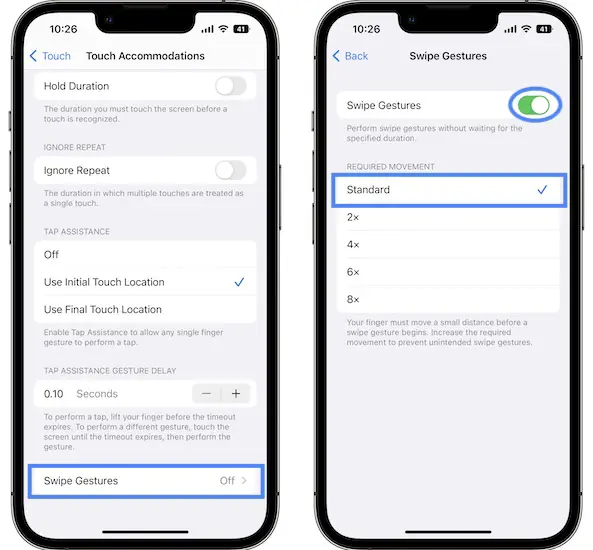
Does this help to fix touch screen not working? Please confirm in the comments!
How To Fix Touch Issues In iOS 16
We’ve also published a video showcasing the troubleshooting sequence presented above:
2. Reinstall iOS 16
You most likely updated to iOS 16 over-the-air. Try to clean install the current version and you might be able to fix the touch screen issue:
- Disable Find My iPhone.
- Connect iPhone to Mac or Windows computer.
- Backup iPhone using Finder or iTunes.
- Restore iPhone and follow the on-screen prompts (the current iOS version will be reinstalled in the process).
3. Downgrade To iOS 15
Shammil has confirmed that reverting to iOS 15 has fixed the problem for him. Here is how to:
- To downgrade you need to connect iPhone to a Mac or Windows computer via a Lightning to USB cable.
- Perform a full Backup of your device before starting.
- Download the appropriate iOS 15.7 ipsw file as shown here.
- Restore iPhone using the file that you previously downloaded!
Have you managed to fix touch not working in iOS 16? Do you have a better solution? Use the comments section to share your feedback.
Related: Other common bugs reported for these early stages are:
– Duplicates folder not available in Photos.
– Assistive Touch stuck after update.
Same problem on iPhone XS. Screen not responsive, extreme UI lag after installing ios 16
Thanks for confirming Mehdi. This appears to be a problem with older iPhone models in the iPhone X, XS, XR range. Try to clean install iOS 16!
Since the update for ios 16
The screen bug commands difficult or even impossible. This is an iPhone xr 128 giga
Translated from French:
Depuis la mise a jour pour ios 16
L’écran bug commande difficile voir impossible. Il s’agit d’un iPhone xr 128 giga
Thanks for confirming Carter. Try to reinstall iOS 16 with computer.
How to clean iOS 16?
Steps are listed in the article. Clean install is the same with reinstall:
Disable Find My iPhone.
Connect iPhone to Mac or Windows computer.
Backup iPhone using Finder or iTunes.
Restore iPhone and follow the on-screen prompts (the current iOS version will be reinstalled in the process).
Hi,
Does reinstalling iOS 16 means deleting all the data from my iPhone?
You have to do a full backup after connecting iPhone to computer. Reinstalling will wipe everything out, reinstall the software and then you have the option to Restore from the previously saved backup.
disable Find my iPhone does not work because of 2 Factor Authentification
You mean you don’t have a second trusted device to validate 2FA?
Using XS anf right after ios 16 update the touch is not working properly, home screen and control center everything
Thanks for confirming. Sorry to hear this. You might have to revert to iOS 15, until Apple issues a software update.
How to revert to 15 without any data loss?
A step-by-step guide is available here:
https://www.iphonetricks.org/downgrade-ios-16-0-3-to-15-7-without-data-loss/
Thanks so much
It was damn helpful
You’re welcome. Glad it helped!
When does apple release a new update? Anyone idea?
If the bug is serious and reported by many, it might be as early as this week. If not probably next week or within two weeks.
IPhone 11 was working completely fine before IOS 16.
Now the touchscreen is not responsive and misbehaving.
Having a hard time opening an app.
done a complete reinstall of ios16 on my ip11, even worse cant even use keyboard to log in, not recognising 6 digit passkey – im really screwed
Sorry to hear this. Downgrade to iOS 15 and wait for iOS 16.1.
To temparaty fix the issue :
1. Activate touch accomadation in touch settings
2. Set tap assistance to Use initial location
3. Go to Swipe gesture and choose standard
This didnt work for me. The only thing I could do is roll back to IOS 15.
THX god das helped in my case. I have iPhone X and the same problems as reported with the iOS 16 Update.
Thanks for confirming the fix Stefan. We will update it in the main content of the article!
Thanks for the contribution Mehdi. I’m updating your workaround in the main content of the article to make it more visible!
Thank you so much. It worked for me too. I was desperated! I will deff turn off automatic updates on IOS.
It worked! My iPhone XS still feels kinda different but it work too.
This has worked for me on iPhone X but before it was stuck and couldn’t scroll after the update of iOS 16
You can triple-click Side Button and use Voice Over if it’s available among the Accessibility Shortcuts.
Same issue and it seems to be that the iPhone has had a screen change to a none Apple screen. Thsi would suggest apple are preventing screens from other providers. I rolled back to IOS 15 and the phone works fine by the warning around the screen been an incompatible part number.
Thanks for sharing. Yes, this sounds as something that Apple would apply. iOS 16.1 will tell if it’s just a bug or intended behavior.
Can confirm i have a third party screen and after updating to IOS 16 i was hit with a serious case of ghost touch. Made the phone unusable. Reverted back to IOS 15, working fine again.
How to revert to ios 15 without any data loss?
can you explain where have you find a signed version of any IOS 15 to downgrade with itunes? or which tool have you used for the downgrade?
Unfortunately, there’s no more signed version of iOS 15. You have to wait until iOS 16.0.2 or iOS 16.1 are released… or go now for the iOS 16.1 Beta 2. (do a backup before updating though in case you don’t like iOS 16.1 and want to revert back to iOS 16.0)
Bolches yarboclos
I will downgrade to 15.7 and see what happens.
I have an iphone xs max and I have the same issues since downloading the new IOS version 16
I tried everything but even when doing the downgrade to the version 15 it is worst than ever – I also restaure the iphone but nothing is working
I called apple they told me that no one have these kind of issues
I went to an apple store they told me that I have an issue with the screen which can not be the case because I never changed it (and bought my iphone in an apple store)
Please if you have the issue – reach out to apple to show that its happened a few times
If you have any advice please let me kow
Sorry to hear this Audrey. You should have showed them the comments of this article to prove that you’re not the only one.
Try to apply this fixes and let us know if it works:
1. Open Settings -> Accessibility -> Touch and turn ON Touch Accomodations.
2, Select ‘Use Initial Touch’ Location in Tap Assistance.
3. Tap on Swipe Gestures , turn them ON and select Standard.
This worked for me!!! I have an iPhone X and have been experience all the ghost touch, crazy issues everyone has experience above. As reference, I have a 3rd party screen that’s been replaced at least 4x. This has finally made my iPhone useable again.
Glad it did! Thanks for confirming.
thanks a lot for your feedback – I did the changes on the settings but unfortunately issue is still occurring even if it seems to be a little better – the iphone is not usable
hoping for a new version soon – but I have some doubt if no one is giving the alert to apple
For people that have the issue from which country are you (I bought my phone in the us)
Thank you so much, This works for me too.
i have an iPhone X and the same problems with the iOS 16 Update. iOS 15 had no problems. The touch settings posted by user medi above helped in my case. It does still not work perfect but it is usable again in a way that I will be able to wait for an update which will hopefully fix the issue
I’ve had ios16 on my XR for one day, and the touch screen has suddenly completely stopped working this afternoon. I’ve restarted my phone several times but there’s nothing I can do since the touch screen is completely broken. It’s so frustrating…
We’ve updated a workaround in the main content of the article. Check it out please and let us know if it works.
Step 1 worked on my iPhoneXR. Thanks!!!
Spoke too soon, issue has reoccurred. Can’t even slide screen to unlock.
Have you tried to force restart iPhone?
Yup, force restart fixed it again but still hoping for a permanent fix from Apple.
Yes, we all do issue has been reported! FB11517894
Great! Happy to help.
The first step worked for my iPhone 11. Thank you so much!!
Great! Happy to help!
Jesus, thanks for your help :D
I have an XR 256GB
Glad this worked out for you!
Touch accommodation worked perfectly for me
Great. Do you experience any other iOS 16 issues?
Wow, as soon as i followed the steps for touch accomodation, touch screen worked properly. Many thanks for the guidance.
You’re welcome! Always happy to help!
The option no “1. Workaround For iOS 16 Touch Problems” worked for me it solved my screen touch lag issue. Thanks!
Adjusting the touch settings as described worked- thank you!
Good Morning,
Your directions: Workaround For iOS 16 Touch Problems fixed my touch screen issues. Thank you.
If issues get resolved, how to I change it back?
I spoke too soon. It is not working again.
Force restart device as shown here: https://www.iphonetricks.org/how-to-force-restart-iphone-13-lineup/
This worked for my iphone 11 thank you so much. I almost broke my phone because of this
You’re welcome. We’re happy that it did.
Can the update ios 16.1 can resolve this problem?
Fingers crossed! We need people with an aftermarket screen do test it out: https://www.iphonetricks.org/ios-161-beta-issues-bugs-fixed-new-features/
I downloaded the new update 16.0.2 and its the same for my Iphone X
I just got the new 16.0.2 update and its the same WHAT THE HECK IS GOIN ONNNNNNNNN
Yeah, Apple messed up.
How do I restore iOS 15.6.1 to my iPhone X??
Download the iOS 15.6.1 IPSW file from here: https://ipsw.me/product/iPhone.
Connect iPhone X to computer, create Backup and hold alt/option + click on the Restore iPhone on Mac (On Windows Shift + click Restore iPhone).
Select the recently downloaded iOS 15.6.1 ipsw file and follow the on-screen prompts.
it gives an eror while extracting the version on itunes, something about the file not being signed, can you explain how to find this signed version? or to sugest another program than itunes for the downgrade?
I have iphone x 256gigs. Touch accommodation working perfectly fine like on ios 15.7
Just a manual tip/workaround which made me go through till i got this solution : use second finger or thumb place it on screen in any area without touching any app or button. Touch response gets better with two fingers on screen.
This will help everyone in unlocking and turning on touch accommodation.
Hope apple fixes the bug soon. Thanks to mehdi for the solution
Thanks for the extended feedback and for your contribution Haider! Yep, fingers crossed!
THANK U SM, i truly struggling with the touch screen i wanted to cry but the touch accommodations solved the problem!
i had just installed IOS16 and before that my phone was working perfectly fine, after the update my phone almost didn’t respond to anything i did so thanks a lot <33
You’re welcome! Happy to help!
Hello
I was also facing same problem when i installed ios 16 beta 3 so i have to downgrade to ios 15 at that time. And after downgrading to ios 15 everything was working fine no touch issues than I decided to reinstall to ios 16 when stable version will be released and yesterday i install ios 16 stable version but still i was facing the issue so today i hear about new beta update ios 16.1 and i just installed it now and still no fix of this issue.
Hope so on upcoming ios 16.1 beta apple will fix this problem. I will let you know if this issue is fixed
Thanks for the feedback. Keep us updated.
The option where you go to be settings & accessibility has worked for me.!!! I’m sure this will hold me over until they fix the bug ! I have an iPhone XR.
Great. Let’s hope it’s a bug and not intentional behavior. Is your iPhone XR screen original or has been previously replaced with an aftermarket display?
The accessibility “fix” sadly did not fix the issue for me but it did make the screen better and more usable. I still ended up downgrading back to iOS 15. I really hope Apple issues an actual fix but after talking to Apple Support and after their “senior support specialist” kept pushing me to get my screen replaced and acting like it would silly for their devs to fix an issue that only third party screen users are experiencing I don’t have high hopes.
Thanks for the feedback. Yes, this might be intentional from their end to push people towards AppleCare+ and authorized repair services.
Time will tell. Just check the case FB11517894 and I get, “Recent Similar Reports: More than 10”. People are reporting it. Curious if they’ll patch it or not.
Hey guysssssss, I have done the first example changes, and it worked. I recommend doing that.
Thanks for the trick but it’s not giving me the same feel as before But much better than before.
You’re welcome. Thanks for your feedback.
Same problem with ghost touch on iPhone 11 with a non apple screen replacement. Had to downgrade to iOS 15 to solve it. Now everything is fine.
It was a bit of a struggle to setup the iPhone after the downgrade because the setup guide was kind of forcing me to upgrade to iOS 16. I turned it off in the setup process and tried again. Managed to somehow get pass it eventually – might have switched off wifi but can’t remember. It might also be a good idea to turn off autoupdate before you downgrade (if you can).
Thanks for the detailed feedback. Yes, Autoupdates should be always off. You should have full control when device is updating and always check new updates for major bugs before updating.
Thanks the touch accommodation option worked for my iPhone x
Great. Glad it did!
This issue occurs after I upgraded to iOS16.1.
Accessibility doesn’t work on my 13.
But found another way: Settings > Home Screen >. Search: Turn on Show on Home Screen.
Now the Home Screen is able to swipe, BUT I found the widget previously swipe left from home screen now go UNDER the first Home Screen. This is really awkward. So far the worst iOS upgrade experience ever had.
That’s really strange. iOS 16.1 is in beta 1 stage at the moment, so it’s normal to include bugs. Indeed this beta seems buggier than ever.
The accessibility options seemed to help on my iPhone 12 Pro Max.
Thanks for confirming. Glad they did!
I have had an issue where I cannot swipe left and right through my Home Screen pages since the update. I have an iPhone 12.
I have discovered that disabling the search on the Home Screen fixes this. Found in Setting > Home Screen
Thanks for sharing this Aaron. Interesting find!
I have an iPhoneX with a replaced non-apple screen. Like others have said the screen was either completely unusable or froze within a couple of seconds. I managed to change the touch accommodation settings as you advised and my phone started working as normal. Relief. HOWEVER, for some reason it has now entered a behaviour cycle of working for a while and then being completely broken as before, even with the settings. Really odd behaviour. Its currently completely unusable again and I can’t get past the lock screen or swipe to turn off.
Does it work again if you force restart?
Yup, the same has been happening to me. You can triple click the side button to turn of the touch accommodation settings and if you are then able to struggle your way back and enable them it will start working again.
The first option “1. Workaround For iOS 16 Touch Problems” did the trick on mye girlfriends iPhone 11.
it works thanks
You’re welcome!
tried the first and second options, working for some time and than not working again. when i restart the phone it works again for a few minutes. impossible to handle like that…
can someone help me with the downgrade process? i am receiving an error from itunes while extracting the downloaded file. i understood that its due to the version being unsigned, no signed version for iphone x on ipsw….
Yes, unfortunately downgrading to iOS 15 isn’t possible anymore. Apple has stopped signing it. You can check it here: https://ipsw.me/iPhone10,6
I had the same issue for my XS. Thanks to you the 1st option worked for me but still I encounter the same issue sometimes, probably after a call.
Any advice please?
Nothing else you can do, but wait for a software update and see if Apple address this or it will remain intended behavior for aftermarket replacements.
I have an Iphone XR with a third party screen replacement, DON’T UPDATE YET. Tried 16.0.2 since they mentioned a fix for touch screen issues but it didn’t work again. This time the screen was even less responsive.
I had a hard time finding a signed 15.7 to downgrade since 15.6 versions are no longer signed. I’ll wait for very clear reviews next time since there’s no going back to a previous version.
The workaround using Touch Accommodations is not enough, it lets you move but still your touch screen won’t work well.
Thanks for the feedback Diego. We will update this in the main article!
Hi, Diego did you find a signed copy of 15.7 to downgrade to if so please could you post the link.
I discovered that turning on touch accommodations, setting use initial touch location but turning _off_ swipe gestures for 16.0.2 returned functionality to almost normal on iPhone X. The initial 16.0.2 upgrade with the touch accommodation work around was definitely worse.
It’s better if you turn on swipe gestures but in 8x, going to homescreen will be easier.
Thanks for mentioning this. Indeed it does. We will update the option in the main content of the article.
Same here, I thought the 16.02 update will fix the touch screen iPhone XR issue.
Can’t even swipe up the screen to continue with the setup.
I noticed that the touch screen issue mostly occurs on iPhone XRs with 3rd party replacement screens. Any thoughts?
Yes, definitely the devices with replacement screens are targeted. It’s not clear if they want to target only aftermarket screen repairs and initially they targeted all replacements and iOS 16.0.2 only fine tunes it for third-party ones.
Thanks for the feedback. This is getting really strange. You don’t see often a bug fixed being confirmed by the release notes and not actually included in the update!
Update:
Good News!!! I was able to downgrade my iPhone XR ios16.02 to 15.7 using iTunes.
Thankfully it was still a signed Ipsw. Download link.
Thanks for sharing CzAlain. What backup type did you use to Restore: iCloud or Finder?
Hi, just used iTunes and then hold shift button restore. Thankfully it was still a signed IPSW since iTunes did not give me any error code or message.
Please can you give a detailed explanation how you did yours
Here is a step-by-step-guide:
https://www.iphonetricks.org/how-to-downgrade-ios-16-0-2-to-ios-15-7-without-losing-data/
Thanks
After update of IOS 16.0.2, my swipe up cannot work and the touch screen issues still not fixed.
Thanks for commenting Alex. Not sure what to say. They must have included the fix only in the release notes and not in the actual code.
Thank you sooo much the accessibility changes fixed the swiping on my iPhone XR!
You’re welcome. Are you running iOS 16.0.2?
Mehdi’s fix for the touch screen worked for my wife’s XS. My iPhone 13 was happy with 16.
Glad it does! Thanks for confirming.
I have the xs plus with original screen and having the issues also. 16.0.2 did not fix the issue
That’s strange. You sure that the screen is original and was never replaced? Please confirm once again.
Same issue here, original screen and still touch issue with iOS 16.0.2. I have an iPhone X.
THANKFULLY AND BRILLIANTLY FIXED
iPhone X with replacement screen running iOS 15.? before download. After downloading 16.0.2. Screen wouldn’t swipe after numerous attempts at re-installs, recovery’s. Eventually found that I had a backup to a previous date in iCloud, so managed to get the phone to a stage where I could access the settings.
Followed all of the above and it worked great. These extra tweaks really got the screen response back to how it was prior to iOS 16.0.2.
THANK YOU 🙏
You’re welcome bob. Glad that you managed. If it re-occurs you also have the option to return to iOS 15.7 as shown here: https://www.iphonetricks.org/how-to-downgrade-ios-16-0-2-to-ios-15-7-without-losing-data/
The 1st workaround worked for my phone. The swipes are now working fine. This was really helpful, thank you!
However, there is still the issue of swipe while unlocking the lock screen. My screen doesn’t swipe up.
settings/Accessibility/Touch/Touch accommodations/turn it on/scroll down and select “Use Initial Touch Location”/ go to “swipe gestures” and select 8x to be able to swipe up from the bottom to access the homescreen.
I discovered the following on my iPhone X with iOS 16.0.2.
I had Colorfilters enabled under Accessibility settings.
After disabling the Colorfilter, unlocking my iPhone seems to work fine again (at least it is working fine since I disabled it 2 days ago).
In case the issue gets back, I will report it here again.
Thanks for sharing Ramon. Please keep us updated.
Unfortunately it is not the solution.
Just had another unlocking issue with my iPhone.
Can’t even tap the notifications on the lockscreen.
The only thing I can then do is a hard reset (V-up, V-down, hold Side button).
Thanks for the follow up.
Hi Patricia, do you know whether the issue on iOS 16.0.2 is acknowledges by Apple? Are they working on a permanent fix?
I applied the Accessibility workaround, but now and then I still can’t unlock my phone; also typing feels somewhat different with the workaround in place.
We’ve reported it and surly so have many others. Howwever, we’re not sure yet if this is intended behavior and Apple plans to fix it, or they just fixed the issue in iOS 16.0.2 for devices that have had a genuine screen replacement, leaving those with aftermarket repairs out of the fix intentionally.
We can only see what happens in iOS 16.0.3 which should be released within maximum 48 hours.